@permify-toolkit/cli
CLI for managing schemas, seeding relationships, and querying relationship data from your Permify instance.

Installation
pnpm add @permify-toolkit/cli
Configuration
The CLI relies on a permify.config.ts file in your project root. See Configuration for full details.
Schema Definition Options
Inline Schema (AST-based)
import {
  defineConfig,
  schema,
  entity,
  relation,
  permission
} from "@permify-toolkit/core";

export default defineConfig({
  tenant: "t1",
  client: {
    endpoint: "localhost:3478",
    insecure: true
  },
  schema: schema({
    user: entity({
      relations: {
        manager: relation("user")
      },
      permissions: {
        manage: permission("manager")
      }
    }),
    document: entity({
      relations: {
        owner: relation("user"),
        viewer: relation("user")
      },
      permissions: {
        view: permission("viewer or owner"),
        edit: permission("owner")
      }
    })
  }),
  relationships: {
    seedFile: "./relationships.json",
    mode: "append"
  }
});
File-based Schema
import { defineConfig, schemaFile } from "@permify-toolkit/core";

export default defineConfig({
  tenant: "t1",
  client: { endpoint: "localhost:3478", insecure: true },
  schema: schemaFile("./schema.perm")
});
Tenant Configuration
The --tenant flag is optional if tenant is defined in permify.config.ts.
Resolution order:
--tenantCLI flag (orPERMIFY_TENANTenv var)tenantfield inpermify.config.ts- Error if neither is provided
Commands
init
Scaffolds a starter permify.config.ts in the current directory — the first command to run in a new project. The generated config includes a minimal, valid example schema, so you can immediately run schema validate and schema push.
permify-toolkit init [flags]
Flags:
| Flag | Alias | Description | Required | Default |
|---|---|---|---|---|
--tenant | -t | Tenant ID to prefill into the config | No | t1 |
--endpoint | -e | Permify server endpoint to prefill | No | localhost:3478 |
Example:
permify-toolkit init --tenant my-app --endpoint localhost:3478
If permify.config.ts already exists, init refuses to overwrite it, delete the file first if you want to re-scaffold. After running it, edit the schema to fit your domain and run permify-toolkit schema push to deploy.
Schema
schema push
Pushes the schema defined in your config to the Permify server.
permify-toolkit schema push [--tenant <tenant-id>] [flags]
Flags:
| Flag | Alias | Description | Default |
|---|---|---|---|
--tenant | Tenant ID to push to | From config | |
--create-tenant | -c | Create tenant if it doesn't exist | false |
Examples:
# Push using tenant from config
permify-toolkit schema push

# Push to a specific tenant
permify-toolkit schema push --tenant my-tenant-id

# Push and create tenant if needed
permify-toolkit schema push --tenant new-tenant-id --create-tenant
Schema Validation:
The Permify server validates your schema on push. If there are errors, you'll see a detailed message:
Error: Entity "usr" referenced in relation "document.owner" does not exist
schema validate
Validates your schema locally without connecting to a Permify server. Catches structural errors, broken references, permission cycles, and suspicious patterns before you push.
permify-toolkit schema validate
This command takes no flags. It reads schema configuration from permify.config.ts in the current directory.
What it checks:
| Category | Examples |
|---|---|
| Input | Schema source exists, file readable, .perm extension required |
| Structure | At least one entity defined |
| References | Relation targets exist, permission symbols resolve, traversal targets valid |
| Expression syntax | No dangling operators (owner or), balanced parentheses, no double-dot traversal (parent..view) |
| Cycles | Direct self-reference (view = view), indirect cycles (view → edit → view) |
| Warnings | Unused relations, entities with no permissions |
Output:
When the schema is valid:
✔ Schema is valid
When valid but with warnings:
⚠ Schema is valid with warnings

Warnings:
  1. Entity "document": relation "viewer" is never used in any permission
  2. Entity "organization": has no permissions defined
When validation fails:
Error: Schema validation failed:
Permission "document.view" references undefined relation or permission "viewer"
Examples:
# Validate schema in your current project
permify-toolkit schema validate

# Validate before pushing in CI
permify-toolkit schema validate && permify-toolkit schema push
Run schema validate before schema push for instant local feedback, no server connection needed.
schema pull
Fetches the schema currently deployed on the Permify server and writes it to a local .perm file. The inverse of schema push — useful for snapshotting a live tenant or bootstrapping a local schema from a running server.
permify-toolkit schema pull [--tenant <id>] [flags]
Flags:
| Flag | Alias | Description | Required | Default |
|---|---|---|---|---|
--tenant | Tenant ID to pull from | No | From config | |
--output | -o | Path to write the pulled schema | No | ./schema.perm |
--force | -f | Overwrite the output file if it exists | No | false |
Examples:
# Pull the deployed schema into ./schema.perm
permify-toolkit schema pull

# Pull a specific tenant into a custom path
permify-toolkit schema pull --tenant staging --output ./staging.perm

# Overwrite an existing file
permify-toolkit schema pull --force
If the output file already exists, the command refuses to overwrite it and exits with an error. Pass --force to replace the existing file — useful when re-pulling a tenant into the same path.
Pull from two environments and run schema diff --source between the files to compare them.
schema diff
Previews what will change before pushing a schema update. Compares your local schema (from permify.config.ts) against the schema currently deployed on the Permify server — or against another local .perm file.
permify-toolkit schema diff [--tenant <id>] [flags]
Flags:
| Flag | Alias | Description | Required | Default |
|---|---|---|---|---|
--tenant | Tenant ID to diff against | No | From config | |
--create-tenant | -c | Create tenant if it doesn't exist | No | false |
--source | -s | Path to a .perm file to compare against (local-vs-local mode) | No | |
--verbose | -v | Show raw unified text diff after the structural summary | No | false |
--exit-code | -e | Exit with code 1 if changes are detected (useful for CI pipelines) | No | false |
Examples:
# Compare local schema against what's deployed on the server
permify-toolkit schema diff

# Compare against a specific tenant
permify-toolkit schema diff --tenant staging

# Compare two local schemas (no server connection needed)
permify-toolkit schema diff --source ./old-schema.perm

# Include a unified text diff for full detail
permify-toolkit schema diff --verbose

# CI mode — fail the pipeline if schema has drifted
permify-toolkit schema diff --exit-code
Output:
The command shows a structural summary of changes at the entity, relation, and permission level:
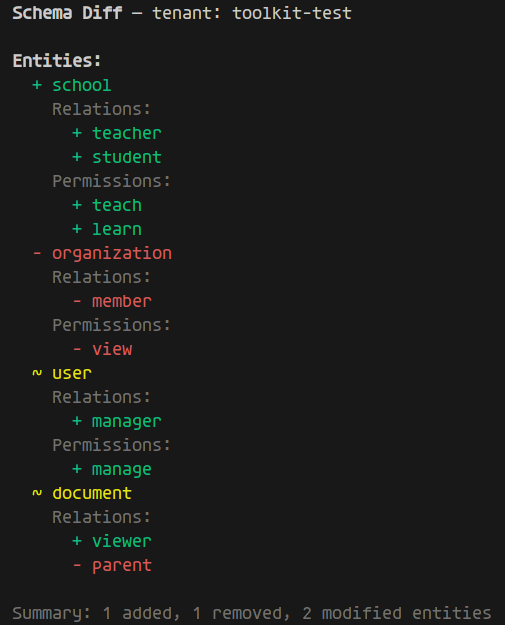
- Green (
+) — added entities, relations, or permissions - Red (
-) — removed entities, relations, or permissions - Yellow (
~) — modified entities (contents changed), or individual relations/permissions whose definition changed
When no changes are detected:
✔ Schema is up to date — no changes detected (tenant: t1)
When no schema exists on the remote server yet (first-time push), everything is shown as additions:
Schema Diff — tenant: t1
ℹ No schema found on remote — showing full schema as additions
With --verbose, a unified text diff is appended below the structural summary:
--- remote (tenant: t1)
+++ local (permify.config.ts)
@@ -1,5 +1,8 @@
 entity user {}
 entity document {
   relation owner @user
+  relation editor @user
-  permission view = owner
+  permission view = owner or editor
+  permission edit = editor
 }
Exit codes:
| Code | Meaning |
|---|---|
0 | No changes detected, or changes detected (default mode) |
1 | Changes detected and --exit-code flag is set |
Combine --exit-code with your CI to detect schema drift:
permify-toolkit schema diff --exit-code || echo "Schema has changed — review before pushing"
Run schema diff before schema push to review exactly what will change on the server. Pair with --verbose for a complete picture.
Relationships
relationships seed
Seeds relationship data from a JSON file.
permify-toolkit relationships seed [--tenant <id>] [--file-path <path>] [flags]
Flags:
| Flag | Alias | Description | Default |
|---|---|---|---|
--tenant | Tenant ID to seed to | From config | |
--file-path | -f | Path to JSON file with tuples | From config |
--create-tenant | -c | Create tenant if it doesn't exist | false |
Example relationships.json:
{
  "tuples": [
    {
      "entity": { "type": "organization", "id": "org_1" },
      "relation": "member",
      "subject": { "type": "user", "id": "alice" }
    },
    {
      "entity": { "type": "document", "id": "doc_1" },
      "relation": "owner",
      "subject": { "type": "user", "id": "bob" }
    },
    {
      "entity": { "type": "document", "id": "doc_1" },
      "relation": "viewer",
      "subject": { "type": "user", "id": "charlie" }
    }
  ]
}
Examples:
# Seed to existing tenant
permify-toolkit relationships seed --tenant my-tenant-id --file-path ./data/relationships.json

# Seed and create tenant
permify-toolkit relationships seed --tenant new-tenant-id --file-path ./relationships.json --create-tenant
relationships list
Queries and displays relationship tuples from a Permify tenant. Useful for debugging authorization — quickly see what relationships exist for a given entity type.
Unlike schema push or relationships seed, this command does not require a schema in your config. It only needs a client connection.
permify-toolkit relationships list --entity-type <type> [--tenant <id>] [flags]
Flags:
| Flag | Alias | Description | Required | Default |
|---|---|---|---|---|
--entity-type | -e | Entity type to query | Yes | |
--tenant | Tenant ID | No | From config | |
--entity-id | Filter by a specific entity ID | No | ||
--relation | -r | Filter by relation name | No | |
--subject-type | -s | Filter by subject type | No | |
--subject-id | Filter by subject ID | No | ||
--output | -o | Output format: table or compact | No | table |
--page-size | -p | Number of results per gRPC page | No | 50 |
Minimal config required:
// permify.config.ts — no schema needed for read-only commands
export default {
  tenant: "t1",
  client: {
    endpoint: "localhost:3478",
    insecure: true
  }
};
Examples:
# List all relationships for the "document" entity type
permify-toolkit relationships list -e document

# Filter by relation and subject
permify-toolkit relationships list -e document -r viewer -s user

# Show a specific entity's relationships
permify-toolkit relationships list -e document --entity-id doc-1

# Use compact output (one tuple per line)
permify-toolkit relationships list -e document -o compact

# Specify tenant and page size
permify-toolkit relationships list -e document --tenant my-tenant -p 100
Output formats:
Table (default):
Entity Type  Entity ID  Relation  Subject Type  Subject ID  Subject Relation
document     doc-1      owner     user          alice
document     doc-1      viewer    user          bob
document     doc-2      viewer    group         eng         member
✔ Found 3 relationships
Compact (one Zanzibar-style tuple per line):
document:doc-1#owner@user:alice
document:doc-1#viewer@user:bob
document:doc-2#viewer@group:eng#member
✔ Found 3 relationships
When no relationships match:
ℹ No relationships found.
Use relationships list to verify that the tuples you expect actually exist in Permify. If a permission check fails unexpectedly, list the relationships for that entity to see what's stored.
relationships export
Exports relationship tuples from a Permify tenant to a JSON file. The output format is identical to the relationships seed input format — so you can export from one tenant and seed into another.
Like relationships list, this command does not require a schema in your config.
permify-toolkit relationships export --entity-type <type> --file-path <path> [--tenant <id>] [flags]
Flags:
| Flag | Alias | Description | Required | Default |
|---|---|---|---|---|
--entity-type | -e | Entity type to query | Yes | |
--file-path | -f | Output file path (must be .json) | Yes | |
--tenant | Tenant ID | No | From config | |
--entity-id | Filter by a specific entity ID | No | ||
--relation | -r | Filter by relation name | No | |
--subject-type | -s | Filter by subject type | No | |
--subject-id | Filter by subject ID | No | ||
--page-size | -p | Number of results per gRPC page | No | 100 |
Examples:
# Export all document relationships to a file
permify-toolkit relationships export -e document -f ./backup/documents.json

# Export only viewer relationships
permify-toolkit relationships export -e document -r viewer -f viewers.json

# Export from a specific tenant
permify-toolkit relationships export -e document --tenant staging -f staging-docs.json
Output file format:
The exported JSON file uses the same structure as relationships seed, so you can directly re-import it:
{
  "tuples": [
    {
      "entity": { "type": "document", "id": "doc-1" },
      "relation": "owner",
      "subject": { "type": "user", "id": "alice" }
    },
    {
      "entity": { "type": "document", "id": "doc-1" },
      "relation": "viewer",
      "subject": { "type": "user", "id": "bob" }
    }
  ]
}
Common workflows:
# Back up relationships before a migration
permify-toolkit relationships export -e document -f ./backup/documents.json
permify-toolkit relationships export -e organization -f ./backup/orgs.json

# Copy relationships from staging to dev
permify-toolkit relationships export -e document --tenant staging -f transfer.json
permify-toolkit relationships seed --tenant dev -f transfer.json

# Export, inspect, edit, then re-seed
permify-toolkit relationships export -e document -f tuples.json
# ... edit tuples.json manually ...
permify-toolkit relationships seed --tenant t1 -f tuples.json
The export format is designed to be seed-compatible. You can export from one environment, review or modify the JSON, and seed it into another — making it easy to migrate or duplicate relationship data across tenants.
Local Development
# Build the package
pnpm build

# Run using local bin script
./bin/permify-toolkit schema push --tenant dev-tenant -c